

Fleet managementReal operating interface
The driver profile starts with daily operations
This section follows drivers from manual creation or mobile application to vehicles, documents, and status, while ratings live in their own quality review page.
Interface preview
Interface language
Interface appearance
4 images
العربية / Lightالعربية / DarkEnglish / LightEnglish / Dark
3Approval states
3Connection states
1Unified operating profile
Operating flow
Search and review by status
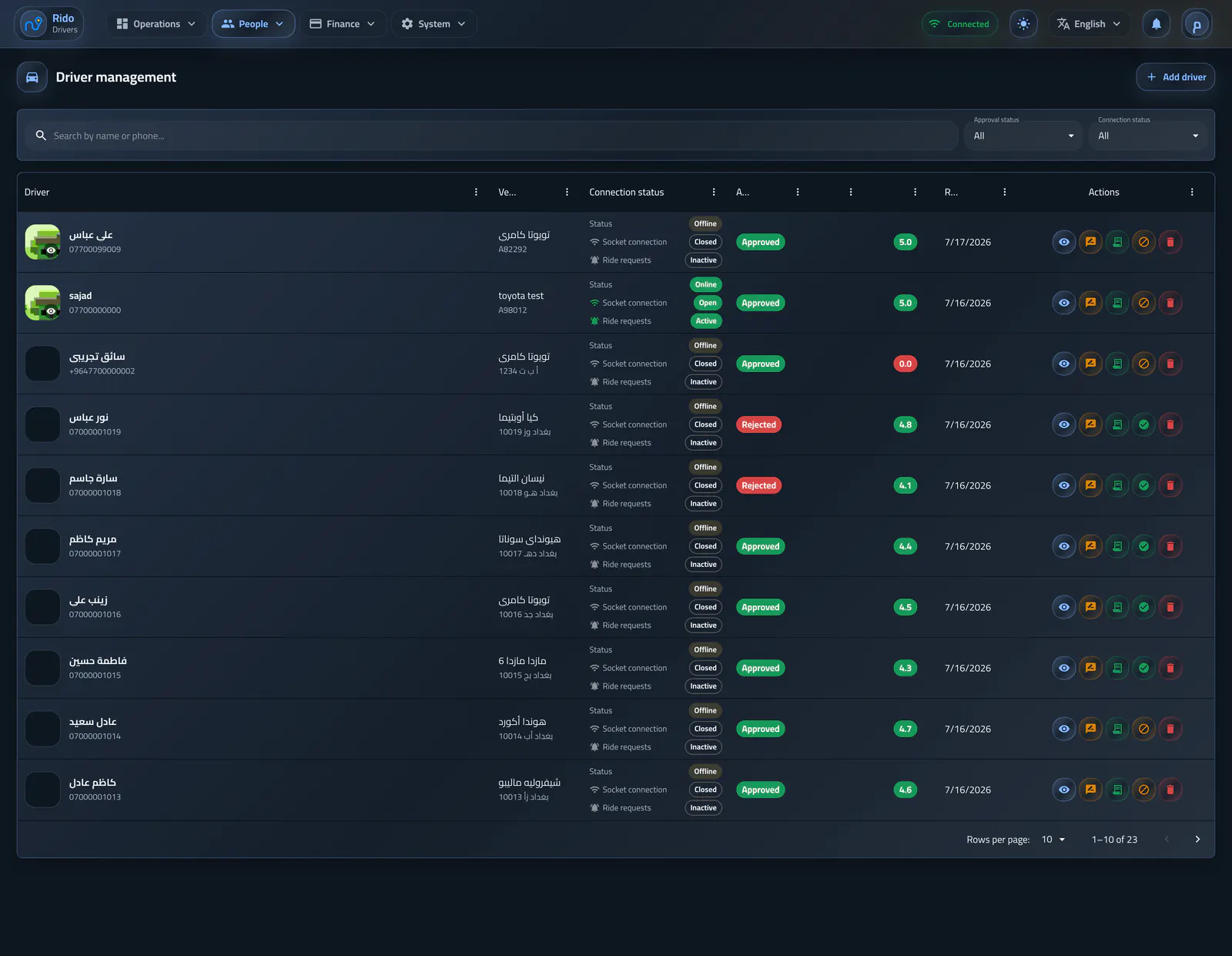
The driver list supports search and approval and connection filters, whether a driver was added manually or applied from the app.- Under review, approved, and rejected
- Online, offline, and unknown
- Manual driver creation and registration follow-up
Driver management and approval
The fleet list combines connection state, application status, vehicle data, and review actions.Operating flow
A profile with operating context
The profile includes the driver photo, documents, vehicle, and actions to approve, reject, suspend, or reactivate.- Full-size photo viewing
- Documents and vehicle information in one place
- Clear approval and suspension actions
- Open finance from the same profile
Driver and vehicle profile
Identity, approval state, vehicle details, performance, and settlement access share one operational record.Operating flow
Deletion that preserves history
Deleting a driver removes linked account, vehicle, documents, wallet, finance, and location data while historical rides remain as records without a live driver link.- Clean linked driver data
- Keep historical ride records
- Protect operating history
Fleet management